Webhooks in an Agent
What is a Webhook?
Webhooks are user-defined HTTP callbacks that are triggered by an event. In Zoho CPaaS, Webhooks relay recipient activity data from the transactional emails, SMS, WhatsApp messages, and voice calls you send to your application in real time. When a tracked event occurs, Zoho CPaaS makes an HTTP POST request to the URL configured in your Agent, instantly notifying your application.
The following events are supported:
- Email: Opens, Link Clicks, Soft Bounces, Hard Bounces, Delivered, and Feedback Loop (spam complaints)
- SMS: Delivered and Undelivered
- WhatsApp: Delivered, Read, and Undelivered
- Voice: Call status
Only the first open instance and unique link clicks are recorded and relayed per recipient for email events. You can preview your Webhook data within an Agent and test it.
Types of Webhooks
Zoho CPaaS supports the following Webhook types.
Bounce Webhook
Using a bounce Webhook you can receive the recipient details when your transactional emails bounce. There are multiple reasons for your emails to bounce. For example, if your recipient's mailbox is full, your email will bounce temporarily. Such temporary bounces are called soft bounces. If the bounce is permanent, due to an invalid recipient email address, it is called a hard bounce.
Email Opens Webhook
Email Opens Webhooks are used to retrieve the recipient details when they open your email. This event is triggered the first time the recipient opens the email. Even if the recipient opens the email multiple times only the recipient details pertaining to the first instance are stored and transmitted by Zoho CPaaS.
Link Clicks Webhook
Sometimes, your transactional emails will have clickable links as a part of its HTML body. Link Click Webhook transmits the recipient details of those who clicked on these links. Zoho CPaaS relays unique clicks information across all the tracked links in the email.
If a recipient clicks on the same tracked link multiple times, only the unique clicks are recorded and relayed by Zoho CPaaS to the application via the Webhook URL.
Email Delivered Webhook
Email Delivered Webhooks confirm that the receiving mail server accepted your message. The event is triggered when the recipient's mail server returns a successful response to Zoho CPaaS.
Delivery to the mail server is not the same as delivery to the inbox. A message can be accepted by the server and still be filed as spam or filtered by a downstream rule. Use the Opens and Link Clicks events to confirm the recipient actually engaged with the message.
Feedback Loop Webhook
Feedback Loop Webhooks notify you when a recipient marks your email as spam. Participating mailbox providers forward these complaints to Zoho CPaaS, which relays them to your application.
Act on these events promptly. Suppress complaining recipients from future sends — a rising complaint rate damages your sending reputation and affects delivery to all your recipients.
SMS Webhook
SMS Webhooks relay the delivery status of the text messages you send through your Agent. Two events are supported — SMS Delivered, triggered when the message is successfully delivered to the recipient's handset, and SMS Undelivered, triggered when the carrier is unable to deliver the message. Undelivered events carry the carrier's failure reason and error code, which helps you identify invalid numbers, blocked routes, or unreachable handsets.
WhatsApp Webhook
WhatsApp Webhooks relay the status of WhatsApp messages sent from your Agent.
Three events are supported — WhatsApp message delivered, triggered when the message reaches the recipient's device; WhatsApp message read, triggered when the recipient opens the message (this is relayed only if the recipient has read receipts enabled); and WhatsApp message undelivered, triggered when the message cannot be delivered, for example when the recipient's number is not registered on WhatsApp or the 24-hour customer service window has expired.
Voice Webhook
Voice Webhooks relay the outcome of calls placed through your Agent. The Call status event is triggered when a call reaches a terminal state, and reports whether the call was answered, busy, failed, or went unanswered, along with the call duration and timestamps.
Configure your Webhook URL
- From the left panel, select Agents and select the Agent for which you want to add Webhooks.
- Navigate to Webhooks tab.
- Click Configure Webhook.
- The Add Webhooks box will appear. Here you can add your Webhook and test it.
- Enter Webhook URL and click Verify to confirm that your endpoint is reachable and returns status code 200.
- Optionally, add an Authorization header by entering an authorization key and its value. This header is sent with every Webhook request, allowing your application to authenticate incoming calls before processing them. This is separate from the Authentication Key described under Authenticate your Webhook URL.
Choose the events for which you want the Webhook to relay data:
- Email event trigger — Open, Click, Soft bounces, Hard bounces, Feedback loop, Delivered
- SMS event trigger — SMS Delivered, SMS Undelivered
- WhatsApp event trigger — WhatsApp message delivered, WhatsApp message read, WhatsApp message undelivered
- Voice event trigger — Call status
You can select events from more than one channel on a single Webhook.
- Enter a Description for the Webhook.
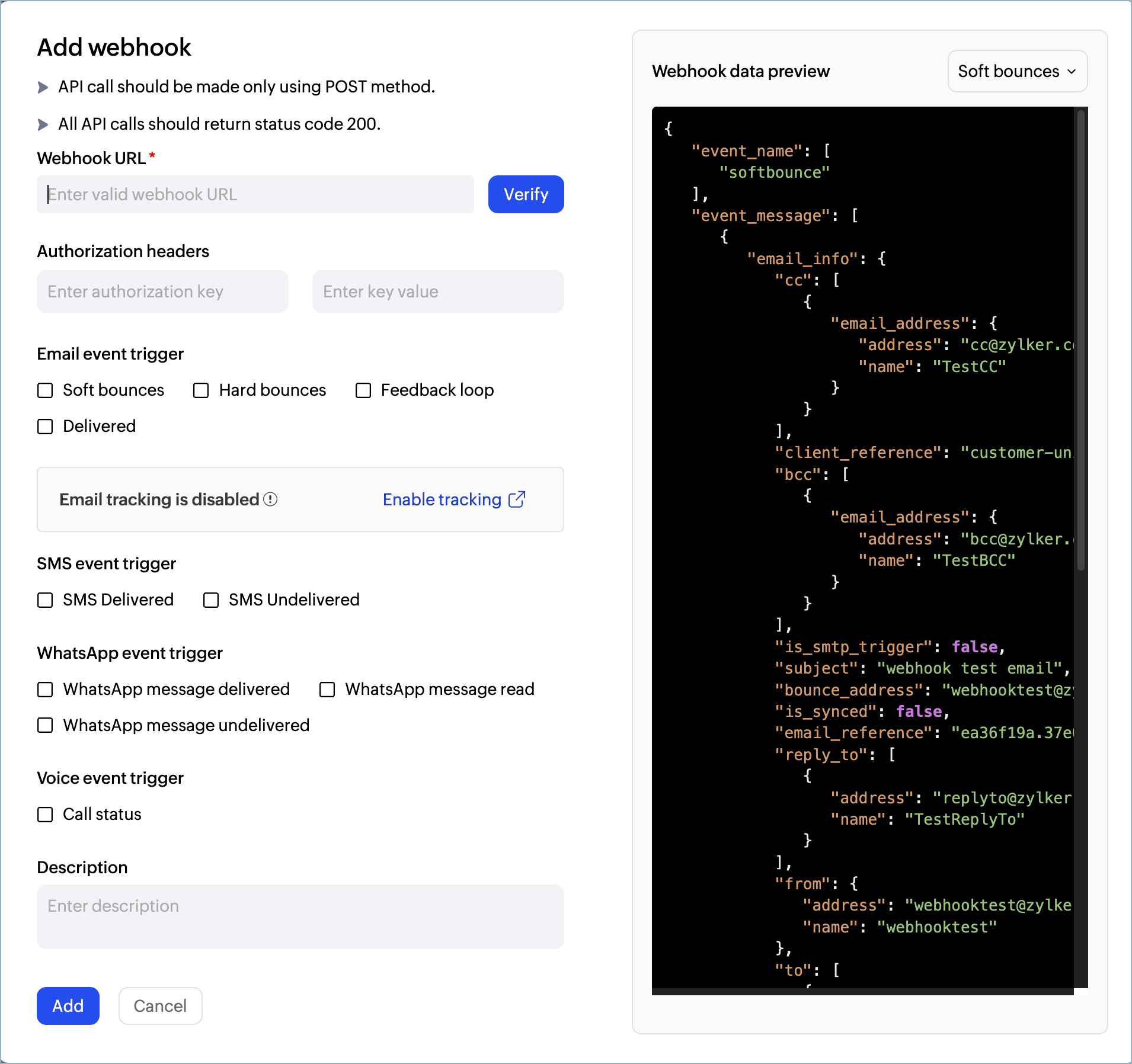
- Click on Add after the required details are filled.
- Webhook is configured successfully.
Edit your Webhook URL
- From the left panel, select Agents and select the Agent for which you want to edit the Webhook.
- Navigate to Webhooks tab. Here the list of Webhooks configured for your Agent will be listed.
- Hover over Webhook to view Edit Webhook icon.
- Click on Edit Webhook to open the Add Webhooks box.
- You can edit Webhook URL, Description, Authorization headers and select/ de-select from these notifications.
- Click on Save to apply the changes to your Webhook URL.
Test your Webhook URL
You can test your Webhook URL while creating a new Webhook URL, or for an existing Webhook URL.
Test events are available for Soft bounce, Hard bounce, Open, and Click. Delivered, Feedback loop, SMS, WhatsApp, and Voice events cannot be simulated. To verify these, send a live message and trigger the event on a real recipient device.
- Navigate to Webhooks tab. You will see the Webhooks page where you can view the list of Webhooks for that Agent.
- If you are adding a new Webhook, click on Add Webhook. If it is for an existing Webhook URL, click on the edit icon located on the right side.
- Now choose the event you want to test by clicking on the drop-down.
- Click on Send Test and check the successful reception of your data.
Authenticate your Webhook URL
Webhook URL should be made public for Zoho CPaaS to send data. Due to its public exposure, the URL is under threat. There is a possibility for hackers to manipulate the URL data by posting irrelevant information to the public Webhook URL. Without verification, your application has no way to tell genuine Zoho CPaaS events from forged ones.
Zoho CPaaS offers two independent protections, and you can use either or both:
- Authorization header — a key and value you set per Webhook, sent as an HTTP header on every request. Your application checks the header before processing the payload. Set this up when you configure the Webhook.
- Authentication Key — a single key set on the Agent. Zoho CPaaS uses it to sign every Webhook request with HMAC-SHA256, adding a producer-signature header. Your application recomputes the signature with the same key and compares the two. A match proves the request came from Zoho CPaaS and that the payload was not altered in transit. Configure it below, then see Securing Webhooks for validation code.
The Authentication Key is the stronger of the two because it verifies the payload as well as the sender. A static Authorization header only proves the caller knows the header value.
To configure the Authentication Key:
- From the left panel, select Agents and select the Agent to which you want to add Webhooks.
- Navigate to Webhooks tab. You will see the Webhooks page where you can view the list of Webhooks for that Agent.
- Click on Authentication Key on the top right corner.
- Enter Authentication Key and click on Configure.
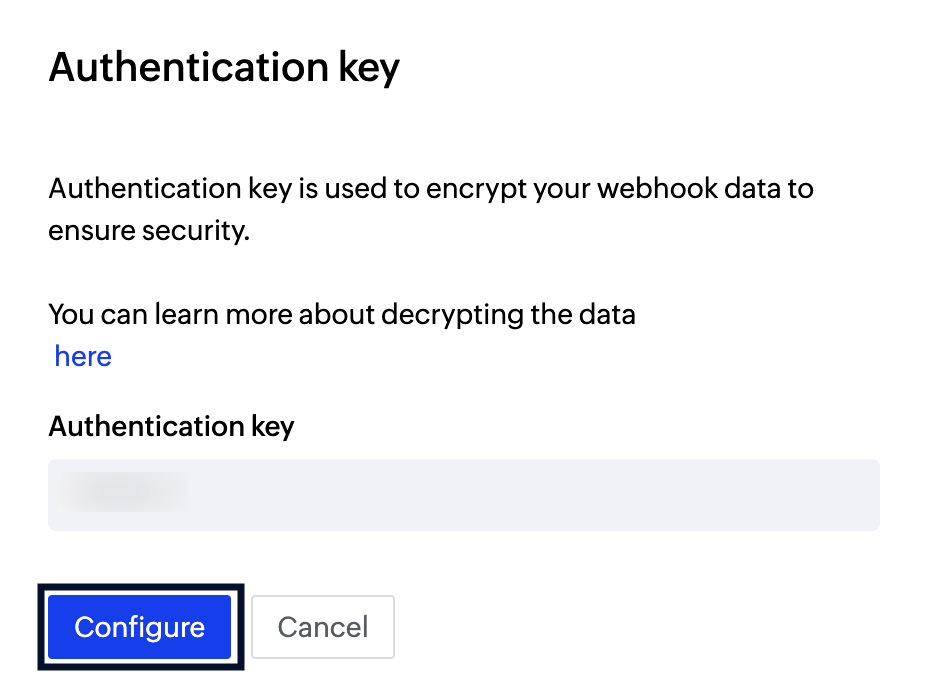
- Use Authentication Key to validate the Webhook data sent to your application.
Treat both the Authentication Key and your Authorization header value like passwords. Store them securely in your application and never expose them in client-side code or version control.
Delete your Webhook URL
You can delete a Webhook URL, however, you will have to add it again to re-use it.
- Navigate to Webhooks tab. You will see the Webhooks page where you can view the list of Webhooks for that Agent.
- Locate the Webhook you want to delete and hover your cursor over it.
- Click on the delete icon on the right corner.
- Click on OK to confirm the Webhook deletion.
Standard Reported Data
Bounce Webhook
- event_name - the type of event. This will be either hard bounce or soft bounce
- event_message - details about the event
- email_info - This provides the details of the bounced email, like:
- email_reference - used to trace the email
- client_reference - it is the customer's unique reference to identify the mail
- is_smtp_trigger - true means the Webhook is triggered using an SMTP
- subject - subject of the bounced email
- bounce_address - the bounce email address configured in the Agent and the name
- from - the sender email address details
- address - the sender email address
- name - the sender name
- to - email address to which the bounce details are to be sent. You can add any number of "to" addresses here
- email_address - JSON array to add multiple email addresses
- address - the email address to which the bounce details are to be sent
- email_address - JSON array to add multiple email addresses
- processed_time - timestamp of when the email was sent
- object - event_message data is for the object email
- event_data - this field provides the reason for the bounce, time of bounce, and the diagnostic message
- details - details of the bounce like reason, time, and diagnostic_message
- reason - the reason for the bounce
- time - the time of bounce
- diagnostic_message - helps in trouble-shooting
- object - event_data is for the object bounce. It can be softbounce or hardbounce
- details - details of the bounce like reason, time, and diagnostic_message
- request_id - unique identifier of your email that was bounced
- email_info - This provides the details of the bounced email, like:
- mailagent_key - the unique identifier of the Agent
- webhook_request_id - this is the unique id for a specific Webhook transaction.
Email Opens Webhook
- event_name - the type of event. The event tracked here is email opens.
- event_message - details about the event
- email_info - this provides the details of the email that was opened, like:
- email_reference - used to trace the email
- client_reference - it is the customer's unique reference to identify the mail
- is_smtp_trigger - true means the Webhook is triggered using an SMTP
- subject - subject of the email that was opened
- bounce_address - the bounce address configured
- from - the sender email address details
- address - the sender email address
- name - the sender name
- to - the recipients of the email that was opened
- email_address - JSON array of recipient addresses
- address - a recipient email address
- email_address - JSON array of recipient addresses
- processed_time - timestamp of when the email was sent
- object - event_message data is for the object email
- event_data - this field provides the details about the event
- details - details like email_client, modified_time, ip_location_info, browser, operating_system, time, and device
- email_client - details of the recipient email client
- name - name of the recipient email client
- version - version of the recipient email client
- modified_time - time the open event occurred
- ip_location_info - details of the recipient ip location
- zipcode - zipcode of the recipient
- country_code - country_code of the recipient
- city - city of the recipient while the event occurred
- latitude - latitude of the recipient while the event occurred
- country_name - country of the recipient where the event occurred
- ip_address - ip address used by the recipient while opening the email
- time_zone - the recipient time zone
- region - the region of the recipient
- longitude - the longitude of the recipient
- browser - the browser details used by the recipient to open the email
- name - name of the browser
- version - the browser version
- operating_system - the details of the operating system used by the recipient
- name - name of the recipient operating system
- version - version of the recipient operating system
- time - the time of the event occurrence
- device - the details of the recipient device
- name - name of the recipient device
- email_client - details of the recipient email client
- object - event_data is for the object email_open
- details - details like email_client, modified_time, ip_location_info, browser, operating_system, time, and device
- request_id - unique identifier of your email that was opened
- email_info - this provides the details of the email that was opened, like:
- mailagent_key - the unique identifier of the Agent
- webhook_request_id - this is the unique id for a specific Webhook transaction
Link Clicks Webhook
- event_name - the type of event. The event tracked here is email clicks.
- event_message - details about the event
- email_info - this provides the details of the email that was clicked, like:
- email_reference - used to trace the email
- client_reference - it is the customer's unique reference to identify the mail
- is_smtp_trigger - true means the Webhook is triggered using an SMTP
- subject - subject of the email that was clicked
- bounce_address - the bounce address configured
- from - the sender email address details
- address - the sender email address
- name - the sender name
- to - the recipients of the email containing the clicked link
- email_address - JSON array of recipient addresses
- address - a recipient email address
- email_address - JSON array of recipient addresses
- processed_time - timestamp of when the email was sent
- object - event_message data is for the object email
- event_data - this field provides the details about the event
- details - details like email_client, modified_time, ip_location_info, browser, operating_system, time, and device
- email_client - details of the recipient email client
- name - name of the recipient email client
- version - version of the recipient email client
- modified_time - time the click event occurred
- ip_location_info - details of the recipient ip location
- zipcode - zipcode of the recipient
- country_code - country_code of the recipient
- city - city of the recipient while the event occurred
- latitude - latitude of the recipient while the event occurred
- country_name - country of the recipient where the event occurred
- ip_address - ip address used by the recipient while clicking the link
- time_zone - the recipient time zone
- region - the region of the recipient
- longitude - the longitude of the recipient
- browser - the browser details used by the recipient to click the link
- name - name of the browser
- version - the browser version
- operating_system - the details of the operating system used by the recipient
- name - name of the recipient operating system
- version - version of the recipient operating system
- time - the time of the event occurrence
- device - the details of the recipient device
- name - name of the recipient device
- email_client - details of the recipient email client
- object - event_data is for the object email_link_click
- details - details like email_client, modified_time, ip_location_info, browser, operating_system, time, and device
- request_id - unique identifier of your email that was clicked
- email_info - this provides the details of the email that was clicked, like:
- mailagent_key - the unique identifier of the Agent.
- webhook_request_id - this is the unique id for a specific Webhook transaction.
Feedback loop Webhook
- event_name - type of event being tracked. The event tracked here is feedback loop
- event_message - details about the event
- email_info - contains the information of the email that was returned, like:
- client_reference - customer's unique reference to identify the email
- email_reference - reference id used to trace the email
- is_smtp_trigger - specifies if the Webhook is triggered using SMTP. true means the Webhook is triggered using SMTP.
- subject - email's subject
- bounce_address - the bounce address configured
- from - the sender's details
- address - the sender's email address
- name - the sender's name
- to - the recipients of the email that was marked as spam
- email_address - JSON array of recipient addresses
- address - a recipient email address
- email_address - JSON array of recipient addresses
- reply_to - the reply-to information
- address - the reply_to email address
- name - the reply_to name
- cc - the cc'd recipient details
- address - the cc'd email address
- name - the cc'd recipient's name
- bcc - the bcc'd recipient details
- address - the bcc'd email address
- name - the bcc'd recipient's name
- processed_time - timestamp of when the email was sent
- object - type of request sent to the application. In this case, the value will be "fbl_complaint"
- event_data - this field provides the details about the event
- details - details related to the event occurred
- fblFrom - the recipient address from where the event was triggered
- returnPath - the bounce address
- ip - IP from where the request was triggered
- from - the sender address
- to - the recipients of the original email
- object - event_data is for the object fbl_complaint
- details - details related to the event occurred
- request_id - unique identifier of the email that was returned
- email_info - contains the information of the email that was returned, like:
- mailagent_key - the unique identifier of the Agent
- webhook_request_id - the unique id for the specific Webhook transaction
SMS Webhook
- event_name - the type of event. This will be either sms_delivered or sms_undelivered
- event_message - details about the event
- sms_info - this provides the details of the message sent, like:
- message_reference - used to trace the message
- client_reference - the customer's unique reference to identify the message
- sender_id - the sender ID or originating number the message was sent from
- to - the recipient's mobile number in E.164 format
- country_code - the recipient's country code
- message_type - the type of message sent, for example transactional
- segments - the number of SMS segments the message was split into
- processed_time - timestamp of when the message was submitted
- object - event_message data is for the object "sms"
- event_data - this field provides the outcome of the delivery attempt
- details - details related to the event occurred
- status - the delivery status reported by the carrier
- time - the time at which the status was received
- reason - the reason for failure. Returned for undelivered events
- error_code - the carrier error code. Returned for undelivered events
- object - event_data is for the object "sms_delivered" or "sms_undelivered"
- details - details related to the event occurred
- request_id - unique identifier of the message
- sms_info - this provides the details of the message sent, like:
- mailagent_key - the unique identifier of the Agent
- webhook_request_id - the unique id for the specific Webhook transaction
WhatsApp Webhook
- event_name - the type of event. This will be whatsapp_delivered, whatsapp_read, or whatsapp_undelivered
- event_message - details about the event
- whatsapp_info - this provides the details of the message sent, like:
- message_reference - used to trace the message
- client_reference - the customer's unique reference to identify the message
- waba_number - the WhatsApp Business number the message was sent from
- to - the recipient's WhatsApp number in E.164 format
- message_type - the type of message, for example template or session
- template_name - the name of the template used. Returned for template messages
- processed_time - timestamp of when the message was submitted
- object - event_message data is for the object "whatsapp"
- event_data - this field provides the outcome of the delivery attempt
- details - details related to the event occurred
- status - the status reported by WhatsApp
- time - the time at which the status was received
- reason - the reason the message was not delivered. Returned for undelivered events
- error_code - the WhatsApp error code. Returned for undelivered events
- object - event_data is for the object "whatsapp_delivered", "whatsapp_read", or "whatsapp_undelivered"
- details - details related to the event occurred
- request_id - unique identifier of the message
- whatsapp_info - this provides the details of the message sent, like:
- mailagent_key - the unique identifier of the Agent
- webhook_request_id - the unique id for the specific Webhook transaction
Note: the read event is relayed only if the recipient has read receipts enabled in WhatsApp. If a recipient has them turned off, you will receive a delivered event but never a read event for their messages.
Voice Webhook
- event_name - the type of event. The event tracked here is call_status
- event_message - details about the event
- call_info - this provides the details of the call placed, like:
- call_reference - used to trace the call
- client_reference - the customer's unique reference to identify the call
- from - the caller ID or originating number
- to - the recipient's number in E.164 format
- direction - the direction of the call, for example outbound
- processed_time - timestamp of when the call was initiated
- object - event_message data is for the object "call"
- event_data - this field provides the outcome of the call
- details - details related to the event occurred
- status - the terminal status of the call, such as answered, busy, failed, or no-answer
- start_time - the time at which the call was connected
- end_time - the time at which the call ended
- duration - the duration of the call in seconds
- reason - the reason the call was not completed. Returned for unsuccessful calls
- error_code - the error code returned by the carrier
- object - event_data is for the object "call_status"
- details - details related to the event occurred
- request_id - unique identifier of the call
- call_info - this provides the details of the call placed, like:
- mailagent_key - the unique identifier of the Agent
- webhook_request_id - the unique id for the specific Webhook transaction
Securing Webhooks
Securing your Webhooks is recommended as it helps you determine if the requests have actually originated from Zoho CPaaS. To enable you to verify the Webhooks, Zoho CPaaS adds a signature to all its Webhook requests. This adds an extra layer of security to your Webhooks. Signing uses the same Authentication Key you configured under Authenticate your Webhook URL — there is no separate signing secret.
Validating Webhook requests
Each Webhook request contains a producer-signature in their request header that is used to verify whether the request is generated by Zoho CPaaS. The producer signature consists of 3 parts - timestamp, signature, and signing algorithm.
- ts - timestamp is the time when the Webhook request was initiated from Zoho CPaaS server to user-configured URL
- s - the signature is the MAC message generated on encoding the Webhook event notification with the authentication key added by you in your Agent
- s-algorithm - signing algorithm is the standard HMAC SHA256 algorithm used to sign the payload of the Webhook request
Sample producer-signature format: ts=1596109465823;s=dN0yVozgabP5NPlxMDfP1r5u65bVO9kTGEZMIQlqI2o%3D;s-algorithm=HmacSHA256
You can use the below sample code in your application to validate the Webhook request. The method completes normally when the request is genuine, and throws an exception when it is not. Reject any request that fails validation without processing its payload.
Sample code
import javax.crypto.Mac;
import javax.crypto.spec.SecretKeySpec;
import javax.servlet.http.HttpServletRequest;
import java.io.BufferedReader;
import java.net.URLDecoder;
import java.nio.charset.StandardCharsets;
import java.security.MessageDigest;
import java.time.Duration;
import java.util.HashMap;
import java.util.Map;
import org.apache.commons.codec.binary.Base64;
public class WebhookRequestValidator {
    private static final String SIGNATURE_ALGORITHM = "HmacSHA256";
    /**
     * Validates whether the Webhook request originated from Zoho CPaaS.
     *
     * @param request HTTP request received from Zoho CPaaS
     * @param acceptableDuration Maximum allowed difference between when the
     *                           Webhook request was generated by Zoho CPaaS
     *                           and when your application received it
     * @param secretKey Authentication key configured in Zoho CPaaS
     * @throws Exception if the Webhook request is invalid
     */
    public static void validateWebhookRequest(
            HttpServletRequest request,
            Duration acceptableDuration,
            byte[] secretKey) throws Exception {
        String producerSignature = request.getHeader("producer-signature");
        if (producerSignature == null) {
            throw new Exception("Missing producer-signature header");
        }
        Map<String, String> signature = new HashMap<>();
        for (String part : producerSignature.split(";")) {
            String[] keyValue = part.split("=", 2);
            if (keyValue.length == 2) {
                signature.put(keyValue[0].trim(), keyValue[1]);
            }
        }
        String timestampValue = signature.get("ts");
        String signatureReceived = signature.get("s");
        String signatureAlgorithm = signature.get("s-algorithm");
        if (timestampValue == null
                || signatureReceived == null
                || signatureAlgorithm == null) {
            throw new Exception("Malformed producer-signature header");
        }
        // Read the algorithm from the header only to reject unexpected values.
        // Never pass it to Mac.getInstance(): the header is attacker-controlled,
        // and doing so would let a caller downgrade verification.
        if (!SIGNATURE_ALGORITHM.equals(signatureAlgorithm)) {
            throw new Exception(
                    "Unexpected signing algorithm: " + signatureAlgorithm);
        }
        // Reject requests that are too old, and requests timestamped in the
        // future beyond the same allowance, which would otherwise pass.
        long timestamp = Long.parseLong(timestampValue);
        long difference = System.currentTimeMillis() - timestamp;
        if (Math.abs(difference) > acceptableDuration.toMillis()) {
            throw new Exception("Timestamp validation failed");
        }
        // The signature arrives URL-encoded, so Base64 padding appears as %3D.
        // Decode it before Base64-decoding.
        String signatureDecoded =
                URLDecoder.decode(signatureReceived, "UTF-8");
        byte[] received = Base64.decodeBase64(signatureDecoded);
        byte[] expected = sign(readSignedPayload(request), secretKey);
        if (!MessageDigest.isEqual(received, expected)) {
            throw new Exception("Signature validation failed");
        }
    }
    private static String readSignedPayload(HttpServletRequest request)
            throws Exception {
        StringBuilder body = new StringBuilder();
        try (BufferedReader reader = request.getReader()) {
            String line;
            while ((line = reader.readLine()) != null) {
                body.append(line);
            }
        }
        String raw = body.toString();
        // The event is posted as a single form-encoded parameter. Split on the
        // first "=" to isolate the value, then decode it. Decoding the whole
        // body first would turn every "+" in the payload into a space and
        // change the bytes that get signed.
        int separator = raw.indexOf('=');
        if (separator < 0) {
            throw new Exception("Unexpected request body format");
        }
        return URLDecoder.decode(raw.substring(separator + 1), "UTF-8");
    }
    private static byte[] sign(String data, byte[] secretKey)
            throws Exception {
        SecretKeySpec signingKey =
                new SecretKeySpec(secretKey, SIGNATURE_ALGORITHM);
        Mac mac = Mac.getInstance(SIGNATURE_ALGORITHM);
        mac.init(signingKey);
        return mac.doFinal(data.getBytes(StandardCharsets.UTF_8));
    }
}
Before you get started it is important to know that Zoho CPaaS supports transactional communications only. We do not support sending of bulk emails or promotional emails like newsletters or marketing campaign emails. If you are looking for a bulk email provider, check out Zoho Campaigns.