How can PayPal users update invoice status automatically when special characters are used?
If there are non-english characters in fields like Company Name, First or Last Name of your client or your Business Name in PayPal account, you need to update your PayPal account settings and select UTF-8 option for encoding so that the payment status will reflect in the Zoho Invoice account. Please follow the steps below to make the changes in your PayPal account.
- Login to your PayPal account and click on'My Account'.
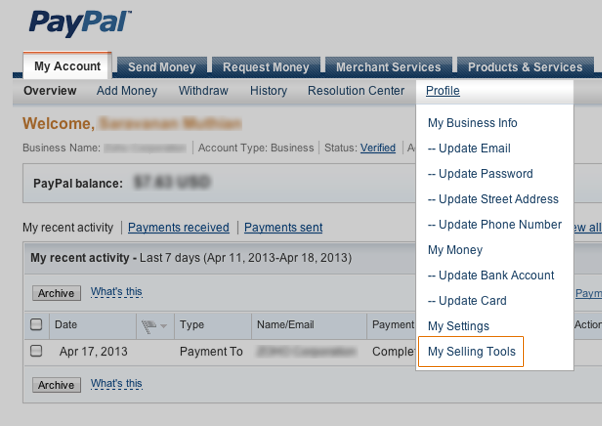
- Select 'My Selling Tools' under 'Profile' in My Accounts as shown in the image below.
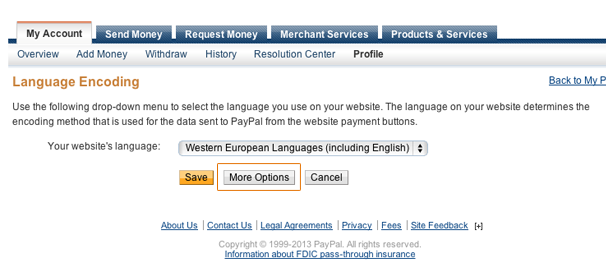
- Scroll down towards the bottom of the page and click on 'PayPal button language encoding' as shown in the image below.

- On the Language Encoding page, select the 'More Options' button.
- On the 'More Encoding Options' page, select UTF-8 for Encoding as shown in the image below.
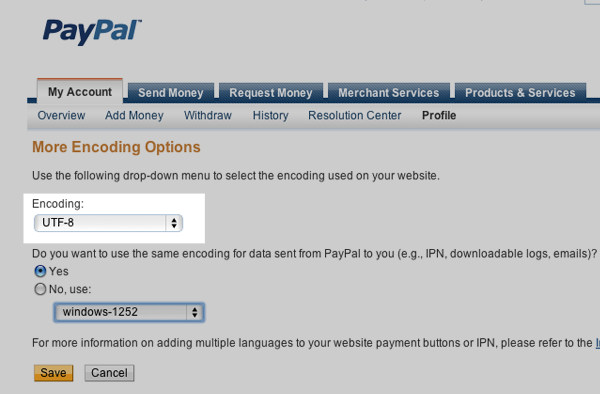
- Click Save.
This will ensure your Invoice Status is updated automatically when online payment is received from customers.