How do I change the invoice number?
To change the invoice numbers that are automatically generated:
- Click the Invoices tab, and then click the New Invoice button that is on the right-side of the screen.
- In the New Invoice page, next to the Invoice#, click the Change Setting link.
- Select the option No if you want to disable the automatic generation of invoice number. This way you'll have to manually enter an invoice number every time you create a new invoice. Choosing Yes will automatically generate an invoice number based on the number you define below.
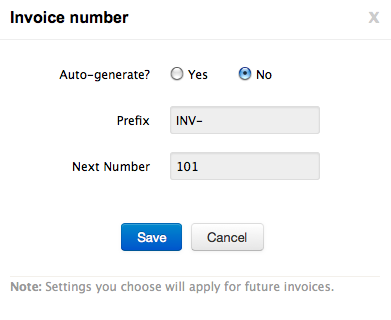
- Prefix refers to the text that is displayed before the invoice sequence number. By default, the prefix in Zoho Invoice is 'INV-'. You can change this to suit your invoice numbering requirements.
- Next Number refers to the sequence number of the next invoice.