

Adding a Member State VAT Rate

To add a VAT rate for a EU country where you sell digital services,
- Click on the Gear icon and navigate to VAT.
- Select the VAT Rates tab.
- Click on +New VAT.
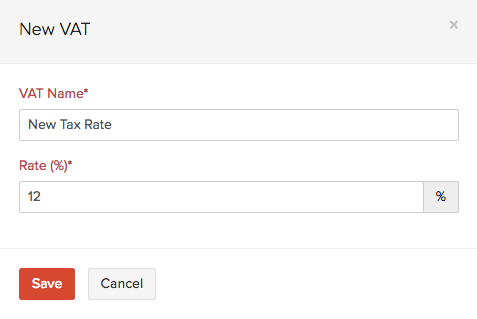
- In the new VAT rate form,
- Enter the VAT Name, i.e: Austrian VAT or Belgium Reduced VAT.
- The VAT Rate(%) for the EU member country.
- Select the country from the EU Member State drop down provided.
- Click on Save.
Notes:Post Brexit (i.e. from 1 January 2021), the tax treatment for all the countries outside the UK will be considered as Overseas. Therefore, UK VAT MOSS will not be applicable when digital services are provided for businesses that are located outside the UK. Instead, you can register for the Non-Union VAT MOSS scheme in an EU member state or register for VAT in each EU member state where you supply digital services.
Notes:Post Brexit (i.e. from 1 January 2021), the tax treatment for all the countries outside the UK will be considered as Overseas. Therefore, UK VAT MOSS will not be applicable when digital services are provided for businesses that are located outside the UK. Instead, you can register for the Non-Union VAT MOSS scheme in an EU member state or register for VAT in each EU member state where you supply digital services.
 Yes
Yes