
Known Issues and Limitations
Table of Contents
- Data center specific feature limitations
- Workflow execution throttle
- Duplicating/Exporting application
- Accessing apps from mobile browsers
- Pages
- Importing subform data
- Exporting as PDF
- Exporting as HTML
- Print records
- Mobile app
- Reports Limitation
- Translation
- Editing records in bulk
- Grouping / Sorting records in Report
- Searching a Report for records
- Limit on number of Dropdown, Radio and Checkbox fields in a Report
- Removing fields/columns from Report Definition
- Grid Report
- Spreadsheet Report
- Limit on the number of Fields in a Form
- Formula field update is not applicable to Lookup/Subform subfields
- Limit on data size in Multi Line and Rich Text fields in a form
- PDF Generation
- Custom Action
- Downloading application backup
- Creating Combined Views with Multi Select Lookup field
- Criteria Limitation
- Shared information not available in restored copy of the application
- Deluge Script Limitation
- Send Mail Task Limitation
- Email Notification
- Multi-column layout
- Limitations with Date-Time handling in Zoho Creator
- Limitation in searching for data in a subform
- Limitation in searching for data in a lookup field
- Limitation in searching for data in multi line field
- Limitation with customer portal
- Limitation in processing external entity in xml content
- A function calling itself (also known as recursive function) cannot be called more than 75 times
- Roles in Pivot Chart
- Clickatell limitation
- Hyphen (-) in Application Link Name must be replaced with underscore(_) when being used in Deluge scripts
- Certain field types are not available for display in a lookup field
Data center specific feature limitations
Due to technical reasons, the availability of some features varies by the data center (DC) your account belongs to. Below is the list of features that are not available in Creator, DC-wise:
- CN: Payment workflows, and cloud functions
- IN: Email data
- AU: Email data, and rebranded mobile apps
Workflow execution throttle
- For a form, a maximum of 100 Deluge-based workflow requests can be executed per minute per IP address. This count includes the execution of the following:
- Deluge script in the On Load form event
- Deluge script in the On User Input form event
- Deluge script in the Subform Add Row form event
- Deluge script in the Subform Delete Row form event
- Formula field's expression
- Lookup field's filter (when it uses another field in that form)
- Deluge script behind button click (when it's a stateless form)
Duplicating/Exporting application
- Duplicating an application or exporting its DS file is not supported when a report in it displays data from 150 fields or more.
Accessing apps from mobile browsers
- Accessing Zoho Creator apps from Opera Mini isn't supported when its data-saving mode is set as Extreme or Automatic.
Pages
- An HTML snippet can contain up to 450,000 characters, or nearly 500 KB
- When you download a page as PDF, the resulting PDF may not display data when there are reports embedded in the page
Importing subform data
- Consider a form that has a subform, which contains a lookup field that has its Add new entries property enabled. When you import a new value to this lookup field, i.e., a value that does not exist in the source form, that subform and main form data will not be imported.
Exporting as PDF
- Exporting a Page as a PDF is not supported when the number of characters it displays exceeds ten million (10,000,000). This count is inclusive of all HTML tags that are used in rendering the Page.
- When exporting a Page or Record Summary as PDF, avoiding page breaks inside tables won't work as expected.
- Exporting a Page as PDF is not supported when the Page contains Pivot Tables, Pivot Charts, or iframes.
- Exporting a Page as PDF does not support <div> based embedding of Forms/Reports and authenticated content like images/css that requires current credentials.
- There’s a 12 MB limit on exporting records in a report as PDFs in the following scenarios:
- When the report is exported as PDF and the data’s size exceeds 12 MB, the operation will fail — a 0 MB sized file will be downloaded instead
- When send mail task includes a report as a PDF attachment and the data’s size exceeds 12 MB, the email will contain a 0 MB sized PDF attachment instead
- Also, as per the limitations in exporting as a PDF file, you can export up to 50000 records.
Exporting as HTML
In HTML file export, media fields will not be exported. Also, in order to prevent the building UI from impacting the performance, you will be limited to export 50,000 records.
Print records
- While printing records, you can print up to 50000 records.
Mobile app
- Since portal is specific to the Creator application, the Sign up option is not available in the Zoho Creator Portal iOS app and rebranded customer app for iOS.
- In a subform, if you have a lookup field that has a filter set based on another field, that filter will not be applied when you edit a record from the mobile app. Instead, the lookup will display all the values (present in the looked-up field).
Reports Limitation
- Duplicating a report is not supported when it displays data from 150 fields or more
- For displaying subform data in a report, you can use up to 20 fields as ‘display fields’
- Displaying Multi-Select/Checkbox and SubForm fields in Pivot Tables and Pivot Charts is not supported. Even if it is enabled in the underlying report, it will not be available in the report builder for use.
Translation
For accounts created after the second quarter of 2016: Translation of names of buttons, days and months in a calendar report is not supported for the following languages: Armenian, Chinese, Filipino, Gujarati, Hebrew, Irish, Kannada, Kurdish, Latin, Lao, Maltese, Norwegian, Swahili, Telugu, Urdu, Yiddish. Instead, they will be displayed in English.
Editing records in bulk
- When you edit multiple records in one go, only the Deluge script present in the OnUpdate block of the respective fields will be executed. Deluge script present in the OnEdit > OnValidate and OnEdit > OnSuccess blocks will not be executed.
- When you edit multiple records in one go, lookup fields that have a filter set based on another field, won't be listed in the Bulk Edit Menu
Grouping / Sorting records in Report
- Sorting based on a users field will not be applied when the distinct number of users (selected in the records displayed by that report) exceeds 500.
- Grouping and sorting of records are not supported when they are based on a Multi select / Checkbox fields or a Multi select Lookup field or a SubForm field. If grouping/sorting using any of these fields is configured:
- For accounts using the New UI: This grouping/sorting will not be applied when the report is accessed
- For other accounts: This grouping/sorting may be inaccurately applied when the report is accessed
- The Custom order under filter columns option and Manual sortingunder sort colums option in kanban report properties are not available in C6.
- The custom order option for both grouping and sorting is not supported in C6.
Searching a Report for records
- For accounts created after the second quarter of 2016, searching a report using a multi-select field (a multi select / checkbox field, or a multi-select lookup field, or a SubForm field) that is present in a related form (related via a multi-select lookup or a SubForm field), is not applicable.
- When the record count in a report is more than 10,000, the AND search for Multi Select / Checkbox fields (as mentioned in this section) will not be available when specifying the search criteria.
- For Reports filtered using the AND search, the Save Changes option (as mentioned here) will not be available.
- Filtered Reports containing more than one search value, will not have the Export as PDF option.
Limit on number of Dropdown, Radio and Checkbox fields in a Report
The number of look up, dropdown, radio and checkbox fields displayed in a report should not exceed 30. The data will not be displayed if you exceed this limit. Here is how the number of such fields is counted:
- Each Look Up, Dropdown, Radio and Checkbox field in the base form is counted as 1.
- Each normal related field in the related fom is counted as 1.
- Each complex related field (look up, dropdown, radio and checkbox) in the related form is counted as 2.
Removing fields/columns from Report Definition
The Report definition allows you to remove maximum of 50 fields at a time.
Grid Report
A grid report will be displayed as a list report if:- Any Deluge script has been added to the On Edit > On Load workflow block of the form it is based on, or the On User Input workflow block of any field (in that form)
- The form it is based on, contains a lookup field that has the 'Set Filter' configured
Spreadsheet Report
- While accessing spreadsheet reports:
- You can't edit rich text fields
- You can't print or duplicate records
- You can't Add New Record to the related Form from the lookup field
- The conditional formatting won't be applied to the drop down, radio, multi select, checkbox, lookup, users, integration and Zoho CRM fields
- A spreadsheet report will be displayed as a list report if:
- Any Deluge script has been added to the On Edit > On Load workflow block of the form it is based on, or the On User Input workflow block of any field (in that form)
- The form it is based on, contains a lookup field that has the 'Set Filter' configured
- Open URL tasks in the On Edit > On Validate and On Edit > On Success workflow blocks won't be executed.
Limit on number of Fields in a Form
Maximum number of fields in a form depends on the type of fields used and the maximum length of the field. Below are the limitations related to field types.
- Single Line, Email, Drop down, Radio, File upload, Phone fields: A Form can have a maximum of 80 such fields
- Multi Select and Checkbox fields: A Form can contain up to 30 such fields. Adding more than this number may cause problems while fetching or accessing the form, or may lead to backup failure.
In cases where your form exceeds these limits, we recommend you to split the form into smaller ones.
Formula field update is not applicable to Lookup/Subform subfields
Formula field update reflects only for modifications in main fields and not in Lookup/Subform subfields. Let's assume we have Form A and B. Form A contains a Single Line field and records are added in that form. Form B has a lookup field related to Form A, and it has a formula field with expression input.lookup.Single_Line.
When the Single Line field value in Form A in edit, the changes do not reflect in Form B. This is because of the formula field expression. This limitation occurs in the following formula field expressions:- input.lookup.<field>
- input.Subform.<field>
This limitation is only for fields using existing relationships.
For instance, we have an order management app with a product form and an order form. The order form has a subform for adding products, which is a relationship created from the existing product form, and includes a formula field for calculating the amount. The calculation applies the formula field expression input.subform.
Limit on Data Size in Multi Line and Rich Text fields in a Form
The maximum data size for a multi line and rich text field in a row is about 64kb.
PDF Generation
Currently Zoho Creator supports PDF rendering only for List Reports and Pages. The PDF format of a list report does not support grouping and summation of numeric columns displayed in the report.
Custom Actions
- Changing the width of columns that display custom actions, is not supported
- Custom actions are available only in the List and Spreadsheet reports
- The openURL task will not be executed, if a user defined function (with the openUrl task) is invoked from a custom action that is placed in the View header and type is set as execute action for each record. Reason: A custom action placed in the view header can be invoked on all or specific records in a view. Hence, if a custom action that executes the openURL task is invoked on all or many number of records in a view, it will open that many browser windows. A user who invokes this custom action may sometimes not be aware of the actual reason for this behavior. Hence, openURL task is not supported when the custom action is placed in the view header.
Downloading application backup
Zoho Creator will not backup the files present in the image, file upload, audio, video, and signature fields
Creating Combined Views with Multi Select Lookup field
If you have a Multi select Lookup field in a Form, the corresponding report will not display related data for the selected field values.
Criteria Limitation
Criteria containing Multi Select field type is not supported.
Unavailability of Shared information in restored copy of the application
When you restore an application from the backed up copy, shared information will not be available. Only the structure of the application and its data will be available.
Deluge Script Limitation
Due to a limitation in Deluge Script, you cannot access DropDown/MultiSelect/CheckBoxes/RadioButtons/Lookup like (input/[COL]).lookup.(DropDown/MultiSelect/CheckBoxes/RadioButtons/Lookup).
Send Mail Task Limitation
- '\n' in the message content of 'plain text mail' will be rendered as newline character.
- Attaching reports using Send Mail task is not applicable for published forms.
- Supports 10MB of attachment data
Email Notification
To avoid spam email messages, if the From address is not a zoho.adminuserid or zoho.loginuserid, the To address can only be zoho.adminuserid and the sendmail task cannot have any CC or BCC address. To overcome this limitation, Zoho Creator allows you to add Verified Email Addresses, than can be used as the From or To email address.
Multi-column layout
Multi-column layouts are not supported if check-box/radio-button fields are added dynamically through scripts.
Limitation with Date-Time handling in Creator
Due to the way we handle Date-Time values entered in a form, a limitation exists when dealing with Date-Time values that fall during the changeover period from PST to PDT and vice versa.
- It is not possible to capture Date-Time values that fall between 2 am - 3 am on the start date of Daylight saving period in the Pacific Timezone. This behavior exists irrespective of Application and Account timezone. The table below shows the start and end dates of Daylight saving period in the Pacific Timezone for each year. For eg, it will not be possible to enter the Date-Time values "13-Mar-2011 2:30:00", "11-Mar-2012 2:33:00", "10-Mar-2013 2:40:00" etc., irrespective of the timezone the user is in, since these Date-Time values fall in the changeover period.
- Any Date-Time value whose equivalent Pacific Time falls between 1 am - 2 am PDT on the end date of the Daylight Saving period will advance by 1 hour. For eg, the Date-Time "04-Nov-2012 08:30:00 Etc/UTC" will advance to "04-Nov-2012 09:30:00 Etc/UTC", since the equivalent PDT value of "04-Nov-2012 08:30:00 Etc/UTC" is "04-Nov-2012 01:30:00 PDT"
- This behavior is universal across Zoho Creator, and occurs when a form is submitted, when an Insert Record Task is executed, when data is imported or updated through API. This also occurs for Date-Time values handled in script.
| Year | DST Start Date | DST End Date |
| 2007 | March 11 | November 4 |
| 2008 | March 9 | November 2 |
| 2009 | March 8 | November 1 |
| 2010 | March 14 | November 7 |
| 2011 | March 13 | November 6 |
| 2012 | March 11 | November 4 |
| 2013 | March 10 | November 3 |
| 2014 | March 9 | November 2 |
| 2015 | March 8 | November 1 |
| 2016 | March 13 | November 6 |
| 2017 | March 12 | November 5 |
| 2018 | March 11 | November 4 |
| 2019 | March 10 | November 3 |
| 2020 | March 8 | November 1 |
| 2021 | March 14 | November 7 |
| 2022 | March 13 | November 6 |
| 2023 | March 12 | November 5 |
| 2024 | March 10 | November 3 |
| 2025 | March 9 | November 2 |
Limitation in searching for data in a subform
- In a subform, you can search for data only in the first field of the subform in the view column. The display order can be changed to search using a different field.
- If the subform has a look up field with advanced display options or drop-down fields, search using that subform field is not supported.
Limitation in searching data in a lookup field
The lookup field supports search using autocomplete. However, the value you enter in a lookup field is searched in each of its display fields. Subsequently, searching a lookup field with a composite value - a value that is made of the values from the display fields and the field separator, is not supported. For example, the following image shows searching a lookup field named Select an employee with "ken". Two values, "Julissa Kent" and "Kenny Joyce" appear. But if you search this field with "Julissa Kent", no record will appear as "Julissa Kent" is neither a first name or a last name; it is a composite value.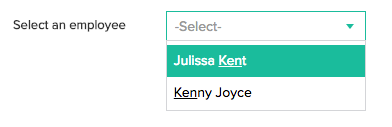
Limitation in searching data in multi line field
Using Search option on multi line field is very inefficient and needs to be avoided to eliminate performance issues. If there is a query that is causing performance issues due to criteria on a multiline field, the system will terminate the query.
Limitation with customer portal
- Customer portals with custom domain name may not work in lower versions of IE (i.e) IE versions below 11.0
- Password reset will not work as intended on a customer portal which is mapped to a custom domain URL, without a SSL certificate installed. Please write to support@zohocreator.com to request SSL certificate installation for the custom domain URL of your customer portal and the team will assist accordingly.
Limitation in processing external entity in xml content
- In Xpath builder, external entity in xml content cannot be processed.
A function calling itself (also known as recursive function) cannot be called more than 75 times.
- A function calling itself (also known as recursive function) cannot be called more than 75 times. If the limit of 75 is crossed, it throws an error "Call Stack limit exceeded".
Roles in Pivot Chart.
- "Roles" is not supported in Pivot Chart/Table.
Clickatell limitation.
- Clickatell does not support "Sprint(iDEN)" network.
Search Limitation in Report containing 10,000 or more records and a Multi-Select field type.
- If a report has more than 10,000 records and has a multi-select field, then the following options will not be available in 'Search by Criteria':
- Is
- Is Not
- Is Empty
- Is Not Empty
Hyphen(-) in Application Link Name must be replaced with underscore(_) when being used in Deluge scripts.
- Hyphen(-) in Application Link Name must be replaced with underscore(_) when being used in deluge scripts.
Certain field types are not available for display in a lookup field.
- Certain field types, such as Multi Line, cannot be set as a Lookup display field. You can work around this by adding a hidden text field (in the form where you're looking-up data) to hold the value of the field you want to display in the lookup.