Configure the Advanced I/O Function
Let’s begin coding the Alien City application by configuring the function component.
The Node.js function directory ( functions/alien_city_function ) contains the following files:
- The index.js main function file
- The catalyst-config.json configuration file
- Node modules
- package.json and package-lock.json dependency files
You will be adding code in the index.js main function file.
The two APIs in the Advanced I/O function that handle the routing between the server and the Data Store are:
- GET /alien: To check whether aliens are present in a city
- POST /alien: To report an alien presence in a city
Install Express Node.js Framework
For the Node.js function, you will be using the Express Node.js framework . To import the Express package in the code, you must install the Express dependencies in your system.
To install Express.js in your local machine, navigate to the Node function’s directory (functions/alien_city_function) in your terminal and execute the following command:
This will install the Express module and save the dependencies.
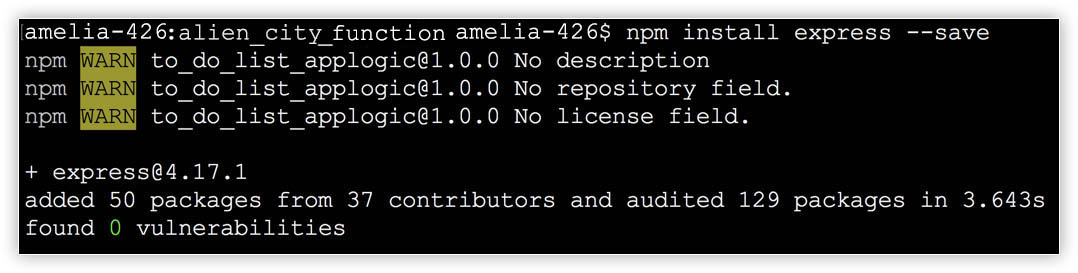
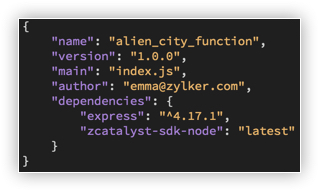
This information will also be updated in the package.json file.
Let’s now add the code in the function file.
Copy the code given below and paste it in the index.js in the functions/alien_city_function directory of your project, and save the file. You can use any IDE of your choice to work with the application's files.
index.js
copy
'use strict';
var express = require('express');
var app = express();
var catalyst = require('zcatalyst-sdk-node');
app.use(express.json());
const tableName = 'AlienCity'; // The table created in the Data Store
const columnName = 'CityName'; // The column created in the table
// The POST API that reports the alien encounter for a particular city
app.post('/alien', (req, res) => {
var cityJson = req.body;
console.log(cityJson);
// Initializing Catalyst SDK
var catalystApp = catalyst.initialize(req);
// Queries the Catalyst Data Store table and checks whether a row is present for the given city
getDataFromCatalystDataStore(catalystApp, cityJson.city_name).then(cityDetails => {
if (cityDetails.length == 0) { // If the row is not present, then a new row is inserted
console.log("Alien alert!"); //Written to the logs. You can view this log from Logs under the Monitor section in the console
var rowData={}
rowData[columnName]=cityJson.city_name;
var rowArr=[];
rowArr.push(rowData);
// Inserts the city name as a row in the Catalyst Data Store table
catalystApp.datastore().table(tableName).insertRows(rowArr).then(cityInsertResp => {
res.send({
"message": "Thanks for reporting!"
});
}).catch(err => {
console.log(err);
sendErrorResponse(res);
})
} else { // If the row is present, then a message is sent indicating duplication
res.send({
"message": "Looks like you are not the first person to encounter aliens in this city! Someone has already reported an alien encounter here!"
});
}
}).catch(err => {
console.log(err);
sendErrorResponse(res);
})
});
// The GET API that checks the table for an alien encounter in that city
app.get('/alien', (req, res) => {
var city = req.query.city_name;
// Initializing Catalyst SDK
var catalystApp = catalyst.initialize(req);
// Queries the Catalyst Data Store table and checks whether a row is present for the given city
getDataFromCatalystDataStore(catalystApp, city).then(cityDetails => {
if (cityDetails.length == 0) {
res.send({
"message": "Hurray! No alien encounters in this city yet!",
"signal": "negative"
});
} else {
res.send({
"message": "Uh oh! Looks like there are aliens in this city!",
"signal": "positive"
});
}
}).catch(err => {
console.log(err);
sendErrorResponse(res);
})
});
/**
* Checks whether an alien encounter is already reported for the given city by querying the Data Store table
* @param {*} catalystApp
* @param {*} cityName
*/
function getDataFromCatalystDataStore(catalystApp, cityName) {
return new Promise((resolve, reject) => {
// Queries the Catalyst Data Store table
catalystApp.zcql().executeZCQLQuery("Select * from "+tableName+" where "+columnName+"='" + cityName + "'").then(queryResponse => {
resolve(queryResponse);
}).catch(err => {
reject(err);
})
});
}
/**
* Sends an error response
* @param {*} res
*/
function sendErrorResponse(res) {
res.status(500);
res.send({
"error": "Internal server error occurred. Please try again in some time."
});
}
module.exports = app;
The functions directory is now configured. We will discuss the architecture of the function and the client in the next section.
Yes
No
Send your feedback to us
Skip
Submit