- HOME
- Product updates
- Introducing the Prefill-Zoho Sheet field
Introducing the Prefill-Zoho Sheet field
- Last Updated : March 20, 2026
- 542 Views
- 3 Min Read
There is an invisible tax on most forms you publish in your organization and it's paid by your respondents in time, frustration, and the quiet decision to abandon the form halfway through. It's the cost of asking humans to re-enter data that already exists in a system they don't have access to.
Think about the forms your organization runs today.
Why does a form at your workplace have to ask employees for their company ID, name, department, and manager when all of that information already exists somewhere with your organization?
Your respondents are silently suffering through forms that ask them to type what your spreadsheet already knows.
If 500 employees each spend 3 extra minutes filling in fields your spreadsheet already contains, that's 25 hours of collective time wasted every single cycle.
We introduced the Prefill-Zoho Sheet field to eliminate this extra work. Instead of asking your respondents to remember or re-enter existing data, you can now let the form retrieve it for them from Zoho Sheet.
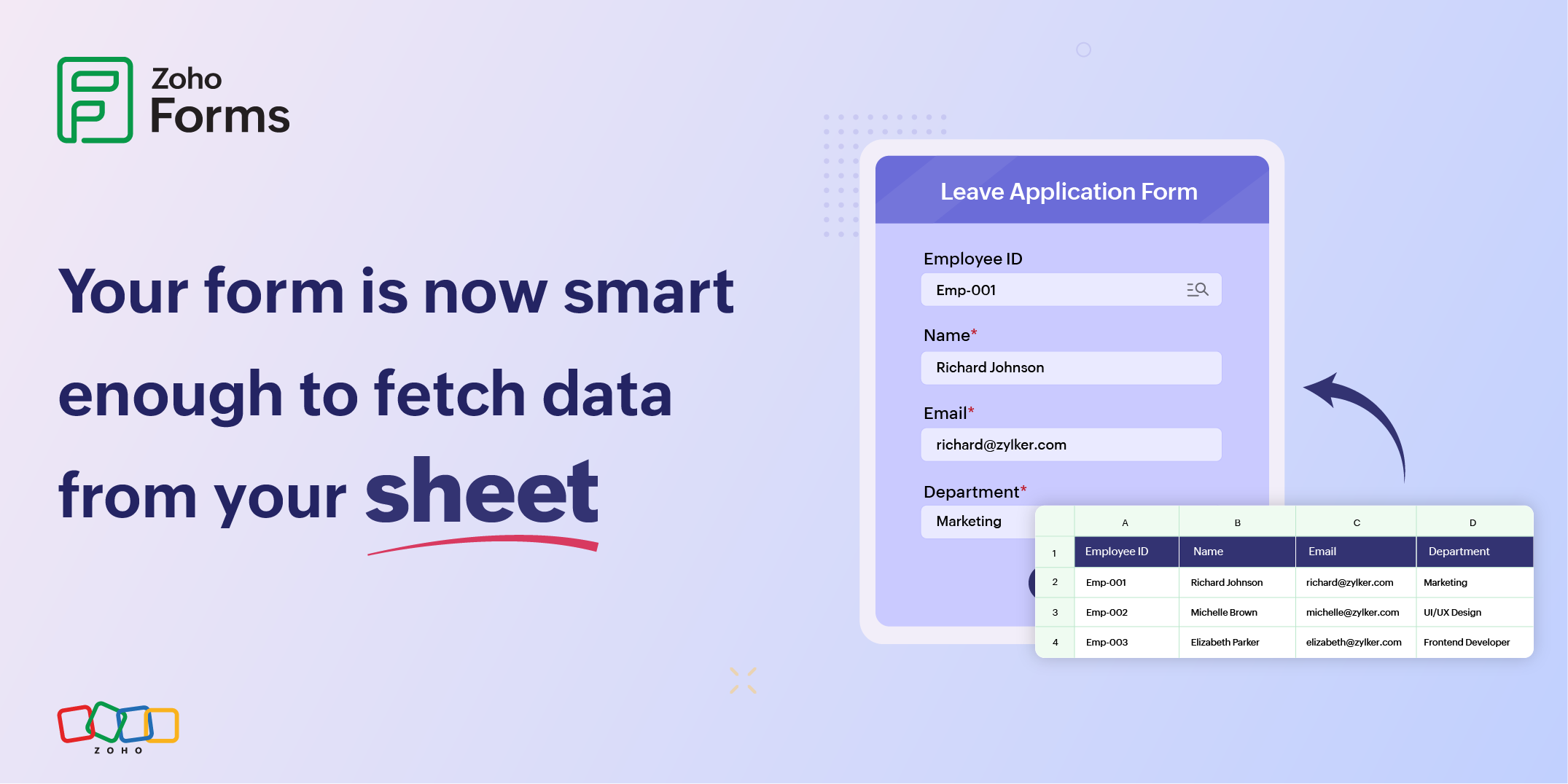
For example, the HR team builds a "Leave Request" form connected to their employee master sheet. Each employee can simply type their ID (e.g., EMP-1001) and click to search. The form looks up for details respective to the employee ID like name, department, email, and reporting manager, then it auto-fills the relevant fields instantly. The employee only needs to fill in relevant details like the leave dates and reason, then they can submit the form quickly.
Three ways to present the search
How the search trigger looks in your live form is entirely up to you. The Search Icon Style property gives you three options, each suited to a different form aesthetic.
You can make it an inline icon that sits inside the field on the right, a separate clickable icon that sits right next to the field, or even a full labeled button that makes the action explicit.
The details that make it genuinely useful
Great features are about how well the edge cases are handled. Here's what sets this feature apart:
Auto-trigger on load
If a form is loaded with a prefilled value via Field Alias, the prefill fires automatically without any click required. Perfect for personalized link campaigns.
Date format conversion
Date and Date-Time fields intelligently convert the sheet's date format into your form's configured date format.
Editable prefill
Prefilled data is not locked. Respondents can review and adjust any auto-filled value before submitting for accuracy.
Learn about configuring this field
What the pros do differently
Use a dedicated, stable worksheet for prefill
Don't map your prefill to a working worksheet that colleagues regularly reorganize, filter, or edit. Create a dedicated "Prefill Master" worksheet so the configuration never breaks due to unrelated changes.
Don't rename sheet headers after configuration
This will silently break your prefill mappings. The form will still search successfully, but the retrieved data won't populate correctly.
Use the button-style search for less-tech-savvy audiences
A labeled button that says "Prefill My Details" leaves zero ambiguity about what will happen.
Open your form builder, drag in the field, connect your sheet in four steps, and watch what happens when your forms finally know what you already know.
 Samhita V
Samhita is a seasoned product expert at Zoho Forms who blends deep product expertise and user education to help businesses make sense of powerful features without the jargon. Known for her thoughtful storytelling and crisp communication, she adds a subtle creative flair to every piece she writes. With a knack for spotting real-world use cases and adding a touch of fun to her narratives, she’s on a mission to make even the most complex workflows feel approachable. Beyond the desk, she channels her creativity into dance and mural art, finding new ways to infuse her surroundings with color, rhythm, and meaning.