- HOME
- Feature Spotlight
- Trigger document generation in Zoho Writer using incoming webhooks
Trigger document generation in Zoho Writer using incoming webhooks
- Last Updated : December 19, 2025
- 706 Views
- 2 Min Read

Hello all,
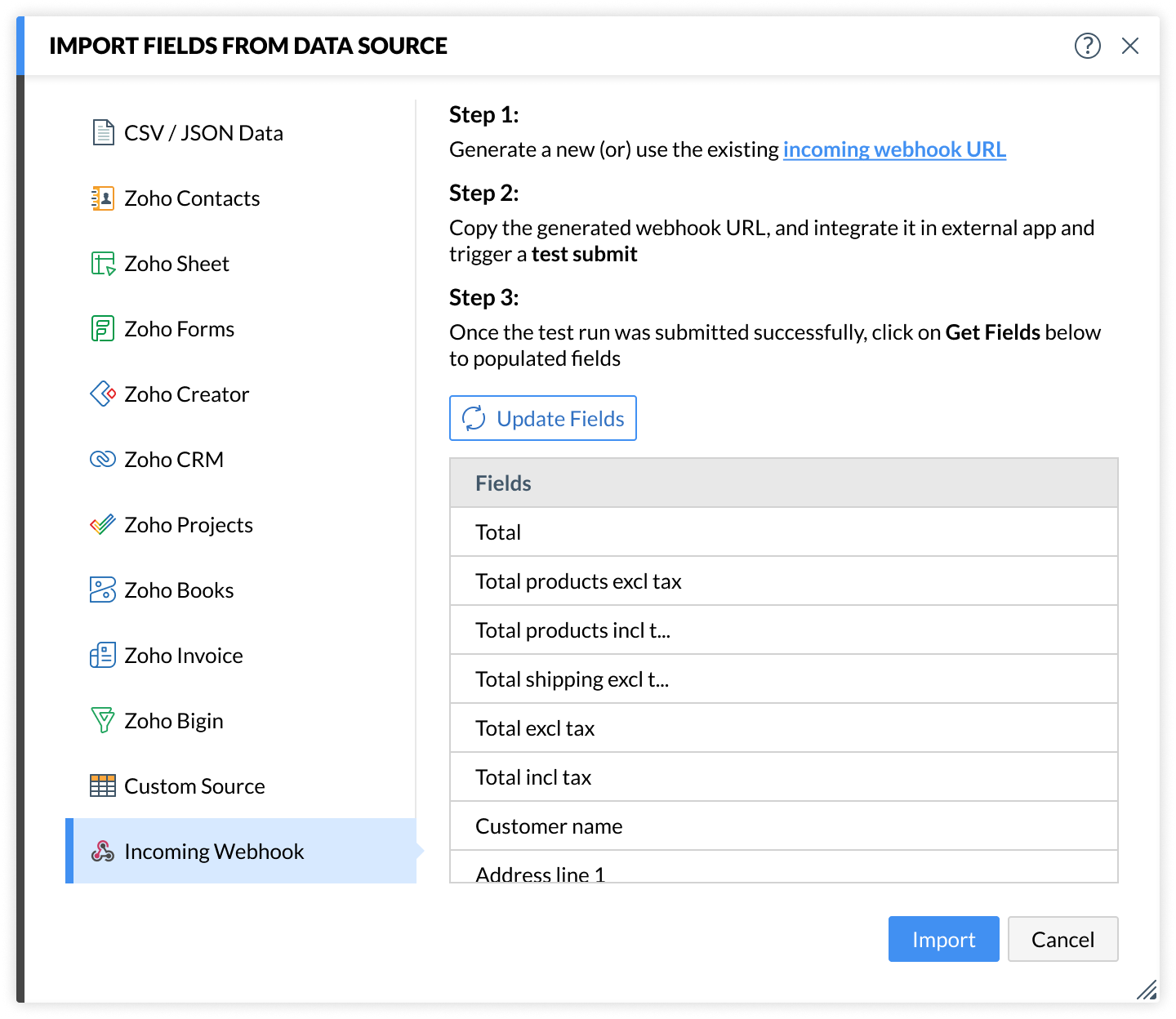
Zoho Writer lets you generate documents using data received through incoming webhooks. With this approach, you can retrieve fields by triggering a test webhook, design your document template using those fields, configure how the output should be delivered, and automatically trigger the merge using the same webhook URL.
This setup is ideal for businesses that rely on real-time data from external applications and need documents generated instantly when an event occurs.
Key benefits
- Event-driven document generation: Documents are created as soon as the webhook is triggered.
- One-step execution: The same webhook supplies data and triggers the merge.
- Flexible integration: Integrating app triggers for automated document generation.
How the webhook-based merge flow works
- Create an incoming webhook in Zoho Writer.
- Fetch and import fields from the webhook payload. Learn how
- Insert those fields into your document template.
- Configure output actions such as email delivery, storage, or secure sharing. Know more
- When data is sent to the same webhook URL, Zoho Writer runs the merge and generates the document.
The incoming webhook acts as both the data provider and the merge trigger, ensuring documents are created exactly when the event occurs.
Example use case
Zylker uses a custom order management system to process online purchases. When an order is confirmed, the system sends order details to Zoho Writer via an incoming webhook, which immediately triggers the merge and generates the invoice and order confirmation document.
Incoming webhooks are one way to trigger document merges using real-time events. If your data lives in Zoho apps, you can also trigger merges when data changes. For example, learn how to trigger document merges when a Zoho Sheet cell is updated .
If your document workflows are driven by real-time events or custom apps, incoming webhooks make it easy to generate documents exactly when data is received.
Try the feature in Zoho Writer. If you have questions or need help setting it up, reach out to us at support@zohowriter.com or at support@eu.zohowriter.com if you're in the EU.
Happy automating!