- HOME
- Know Your Tech
- How to streamline your document approval process
How to streamline your document approval process
- Last Updated : January 26, 2026
- 1.1K Views
- 10 Min Read
A contract lands in someone's inbox on Monday morning, and it needs legal review, finance approval, and a final executive sign-off before Friday. But by Wednesday, nobody knows where it is. Legal says they sent feedback. Finance hasn't seen it. The executive's assistant says it never arrived. The sender is left scrambling, and the client is waiting.
This scenario plays out daily in businesses where document approvals rely on email threads, shared folders, or informal handoffs. When each step depends on manual coordination, documents stall, deadlines slip, and accountability fades. This problem often occurs because of a lack of proper structure for how documents move, who's responsible, and what happens if someone doesn't respond.
This blog post explains where document approval processes typically fail, how to identify those failures in your workflow, and what you can do to fix them. You'll learn how to set clear criteria, define roles that work in practice, and build escalation paths that keep documents moving even when approvers are unavailable or disagree.
Highlights
- Document approval failures usually occur because of unclear criteria and missing accountability.
- Approvers often disagree because the criteria are subjective rather than measurable, which creates decision conflicts.
- Documents stall when escalation paths don't exist, leaving no fallback when primary approvers are unavailable.
- Manual routing creates bottlenecks because each handoff requires someone to remember the next step and take action.
- Testing workflows before full rollout reveals friction points that only appear under real conditions.
What is a document approval workflow?
A structured document approval workflow process eliminates ambiguity and keeps every document on a clear path to completion. It defines the sequence, assigns responsibilities, and reduces manual follow-ups. The outcome is a reliable path from draft to approval that maintains accountability.
Before any proposal, policy, or client deliverable is finalized, it goes through multiple layers of review. Otherwise, without a clear structure, this process becomes fragmented.
However, building a reliable workflow depends on the right structure. Each stage plays a role in moving the document forward, on time, and without confusion.
Key stages of a document approval process
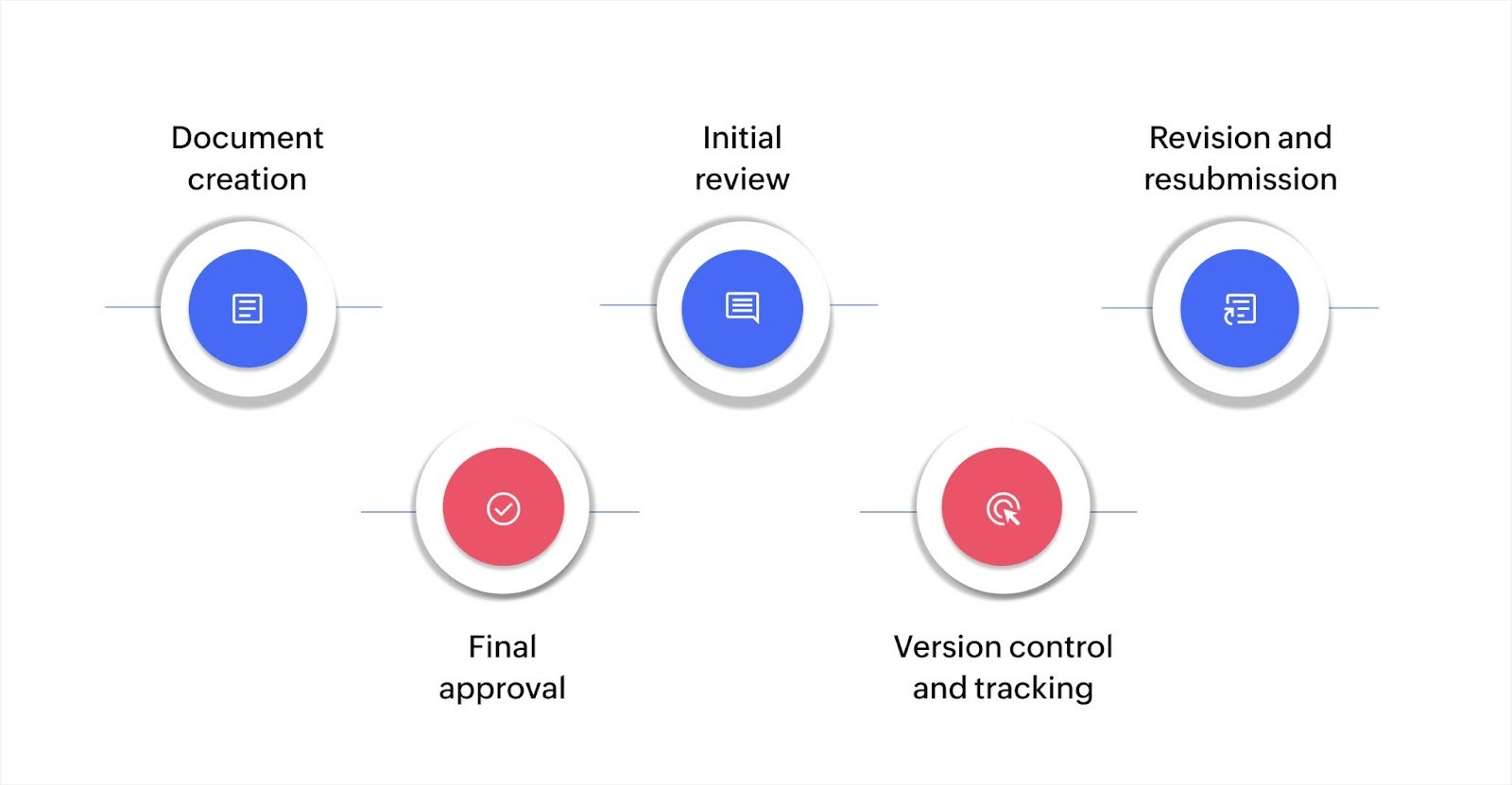
On smaller teams, document approvals often happen quickly. One or two people review and sign off, and the process moves forward. However, as your operations expand, this becomes increasingly difficult to manage.
An approval process outlines the critical stages needed to move every document from draft to approval. Here’s how that flow should work:
- Document creation: The originator drafts the document based on project goals, using a standard format or approved template.
- Initial review: Stakeholders provide input and suggest changes before the document progresses. Feedback must be clear and actionable.
- Revision and resubmission: The author updates the document and resubmits it for the next round. This step may repeat once or twice, depending on complexity.
- Final approval: A designated decision-maker gives formal sign-off. This step often includes legal, compliance, or leadership review.
- Version control and tracking: Finalized documents are stored securely with access logs, timestamps, and approval history for auditing and compliance needs.
Each stage in the process requires specific people to act at the right moment. Understanding who does what is essential to keeping the document approval process on track.
Core roles in the document approval workflow
As approval workflows grow more complex, so do the risks of missed accountability. Tools can track progress, but they can’t replace role clarity. That's why your document approval process should include these roles:
- Document owner: Creates and manages the document from draft to final version and is responsible for incorporating feedback and keeping momentum
- Reviewer: Evaluates content for accuracy, relevance, and completeness; may be subject matter experts, collaborators, or department leads
- Approver: Grants formal sign-off once all revisions are made; usually a manager, department head, or compliance officer
- Administrator: Manages permissions, workflow configuration, and tool setup, ensuring that each stage is tracked and documented properly
But defining roles is just the starting point—to move documents efficiently, those roles must function within an organized workflow.
Where document approval processes actually fail
Most teams focus on setting up approval workflows but miss the common failure points that cause documents to get stuck. Recognizing where things typically break helps you prevent those issues upfront.
- Criteria that sound clear but aren't: Different reviewers interpret "complete" or "compliant" in different ways, which creates inconsistent decisions.
- Approvers who disagree with no tiebreaker: Two approvers at the same level have conflicting views, and nobody is designated to make the final call.
- No fallback when primary approvers are unavailable: Workflows stall completely when the designated approver is out sick or on vacation.
- Manual routing that depends on memory: People forget the next step or send documents to the wrong reviewers because nothing is automated.
- No visibility into current status: Multiple people ask the same approver about the same document because nobody can see where it is.
- High-priority documents treated like routine ones: Urgent documents get lost in queues because there's no way to flag priority or fast-track them.
These failures cause the daily delays teams experience, but knowing about these challenges helps you build and implement workflows that actually work in practice.
How to build an effective document approval process
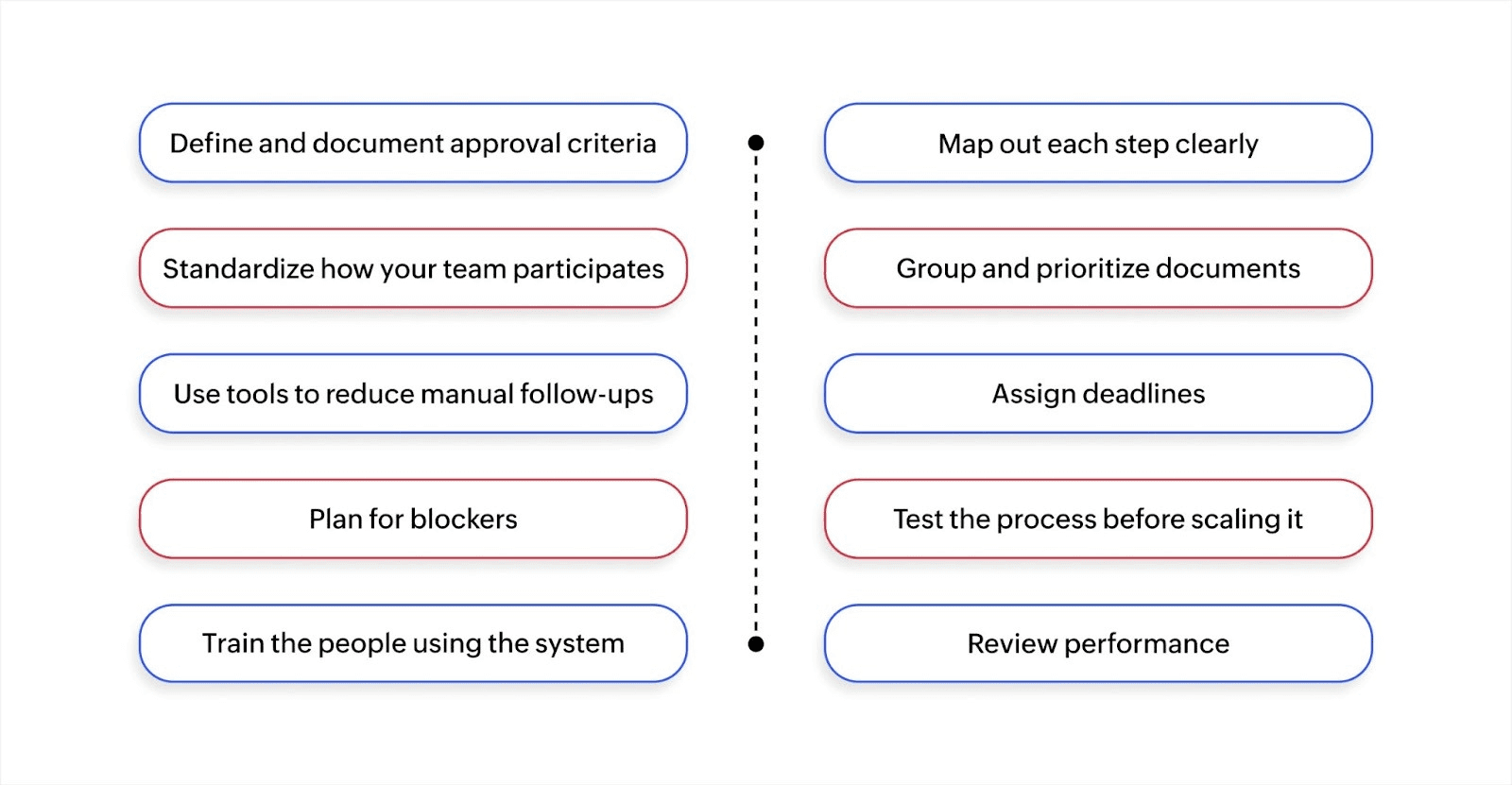
Missed approvals cost you projects, clients, and credibility. Without a clear workflow, documents stall, reviewers argue, and deadlines slip by. Here's how to stop it:
Define and document approval criteria
Every document should be reviewed against specific, measurable standards, not personal preferences. The problem is that vague criteria will mean different things to different reviewers, which creates inconsistent decisions.
For example, legal might approve a contract because the terms look solid, but finance can reject it because budget codes are missing. Both reviewers thought their criteria were clear, but they weren't aligned on what "ready for approval" actually meant.
Once an approval workflow is set up, a contract is only "complete" when it includes client requirements, scope of work, pricing breakdown, legal terms review, and authorized signatures. Anything missing those elements goes back to the draft with specific feedback on what's required. This removes guesswork and makes approval decisions consistent across reviewers.
Map out each step clearly
Unclear steps lead to lost documents and missed inputs. Visually map the entire flow, such as who sends what to whom, and when.
Many teams map flows but ignore conditional paths. For instance, if the CFO only reviews contracts over $50,000, the flow must reflect that. Otherwise, approvals get stuck because high-value contracts wait in a queue the CFO rarely checks, while the CFO gets bothered with routine documents that don't need their attention.
Include every stage, from submission, review, and revision to approval. Build in logic that routes documents based on value, type, or urgency so each document reaches the right people without manual sorting.
Standardize how your team participates
Consistency matters more than speed, so assign responsibilities based on role, not availability. Make sure everyone knows what's expected and when.
The issue is that teams don't follow templates and checklists naturally. People skip steps when they're busy, make exceptions for "urgent" requests, or assume someone else will catch errors. Without enforcement mechanisms, standardization exists on paper but not in practice.
You should also use preapproved templates and make them mandatory. For example, submissions that don't use the template get auto-rejected. Build checklists into your workflow tool, so reviewers can't mark a stage complete without confirming each item. This removes the option to skip steps, which maintains consistency even when people are rushing.
Group and prioritize documents
Contracts and compliance reports require a tighter review loop than an internal memo, so create categories and define different approval paths for each. Reserve fast-tracking for high-priority or time-sensitive documents that can't afford delays.
Classify documents into three tiers: urgent, standard, and low-priority. Only tier 1 gets automatic reminders and appears at the top of review queues. Tier 2 follows the standard approval timeline. Tier 3 can be batched and reviewed weekly. For instance, a client contract with a 48-hour deadline would be tier 1, while an internal policy update can be tier 3.
Use tools to reduce manual follow-ups
Use tools that route documents automatically, send reminders, and track progress. Tools like Zoho Creator let you design approval workflows using visual builders. You can define conditional routing (like "if contract value exceeds $50K, route to CFO"), set up automated notifications when documents need attention, and create dashboards showing which documents are pending and where bottlenecks occur. The platform connects with your existing tools through integrations, so data flows between systems without manual entry.
Workflow automation tools route documents automatically based on predefined rules. Instead of chasing approvals over email, documents move from one stakeholder to the next with built-in triggers. As your organization grows or your processes shift, you can adjust these rules without needing to rebuild everything from scratch.
Assign deadlines
Approvals stall when timelines are unclear, so each step should come with a deadline and a notification. Don't rely on memory or email reminders.
Set realistic timeframes based on document complexity. A simple expense report might need a 24-hour turnaround per stage, while a legal contract review could require 72 hours. Build these timelines into your workflow so approvers see deadlines up front, and the system sends reminders as deadlines approach.
Plan for delays
Delays are inevitable, but your workflow shouldn't stall because of them. Use escalation rules to keep things moving.
For instance, a contract approval workflow can have a primary attorney as the first reviewer. If they don't respond within 48 hours, it escalates to a backup attorney. If neither responds within 72 hours total, it escalates to the legal director with an urgent flag.
Make escalation part of the system, not a personal decision. This avoids confusion, speeds up approvals, and ensures time-sensitive documents don't get stuck.
Test the process before scaling it
Before rolling the workflow out to the entire team, test it in a real project. Watch for where people get stuck or ask for help.
Run 5-10 actual documents through your workflow. Track time at each stage, count how many manual follow-ups are needed, and note every point where someone asks for clarification. For example, a legal team testing their contract workflow might discover that reviewers don't understand when to use "reject" versus "return for revision." That's a training gap that only appears during real use.
Collect feedback, revise the steps, and retest. Measure average approval time, rejection rates by stage, and points where documents stall. Use that data to refine criteria, adjust routing, or clarify instructions before the full rollout.
Train the people using the system
Even the most efficient workflow can fall short if teams don't understand how to use it. Provide structured onboarding sessions, internal documentation, and dedicated time for questions.
Training usually covers standard workflows but ignores edge cases. When approvers face unusual situations, they don't know what to do and either make up rules or escalate unnecessarily.
Walk stakeholders through real-world scenarios where approvers disagree, documents need emergency routing, or criteria don't clearly apply. Create decision trees or reference guides for common exceptions. Show people how to handle situations like "what if this document needs approval from someone not in the workflow?" This builds confidence and reduces errors when exceptions occur.
Review performance
Once your process is in place, monitor how it's performing. Look at how long approvals take, where they get stuck, and who's involved.
Track average time per stage, identify which stages create the longest delays, and monitor approval rates by reviewer. For instance, if 60% of vendor contracts stall at the compliance stage for eight days on average, that's a signal. Investigate whether compliance criteria are unclear, resources are insufficient, or something else is causing the bottleneck.
Use that data to tweak deadlines, redistribute workload, or remove unnecessary steps. Your document approval process should improve with use, not just stay the same.
Features to look for in document approval tools
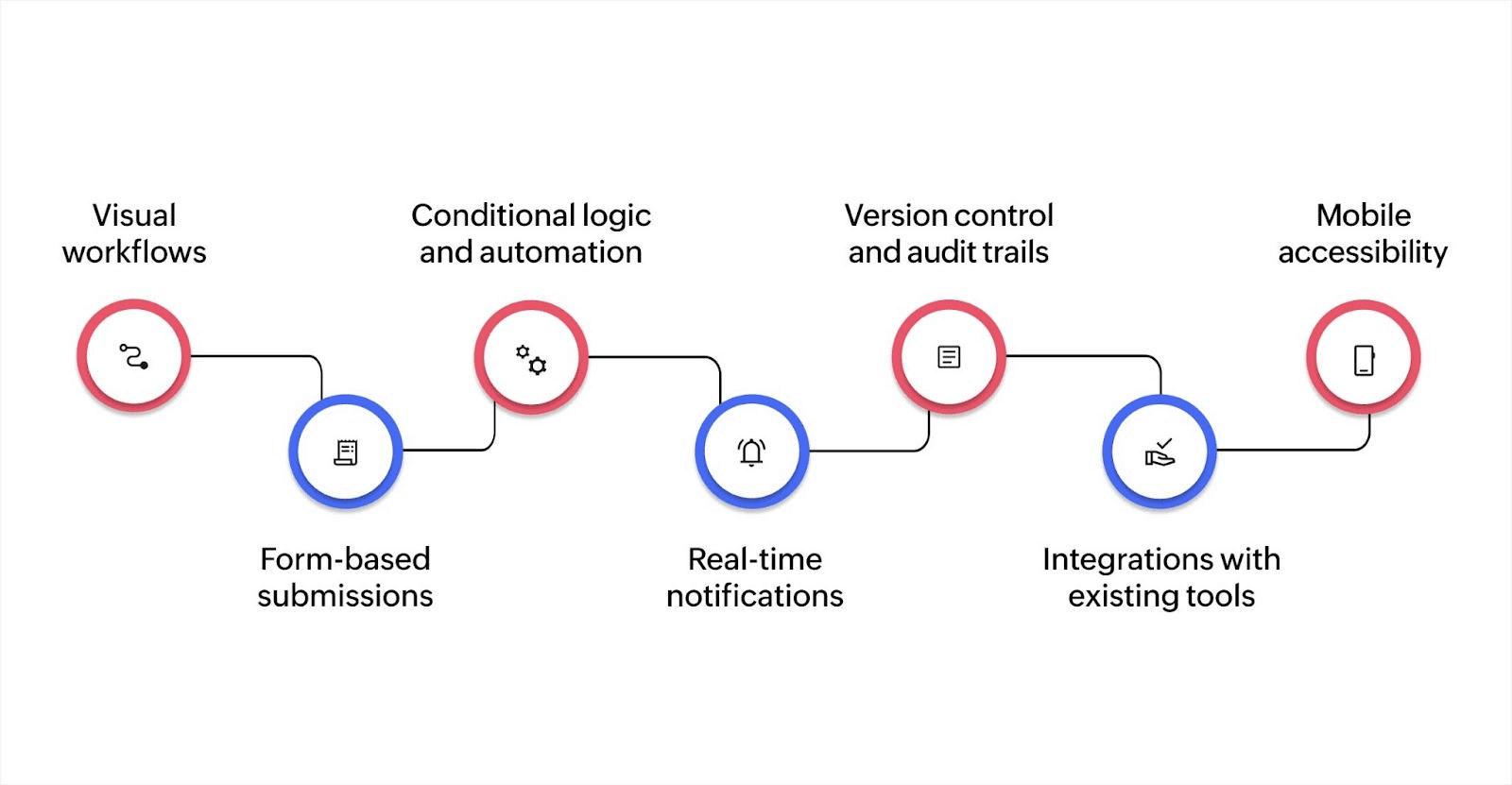
Your selected tool or platform should make each step easier, not add complexity or force workarounds. These are the core features that support an effective document approval process:
- Visual workflows: Modern approval systems offer intuitive drag-and-drop interfaces or flowchart-style views. These make the entire approval path clear on who’s responsible, what’s pending, and what’s next.
- Form-based submissions: Standardized forms ensure consistency at the start of the workflow. Every document is submitted with the right context, data, and supporting details, reducing back-and-forth and unnecessary delays.
- Conditional logic and automation: Approval flows adapt based on the document’s value, urgency, or type. Smart rules automatically route submissions to the appropriate reviewers without manual intervention.
- Real-time notifications: Stakeholders receive instant alerts when a document is assigned, approved, or returned. This keeps everyone aligned, reduces bottlenecks, and shortens turnaround time.
- Version control and audit trails: Every change, whether a comment, edit, or decision, is tracked in one place. This ensures full accountability, especially in compliance-heavy or client-facing processes.
- Integrations with existing tools: A well-designed approval system connects seamlessly with CRM platforms, cloud storage, e-signature tools, and ERP systems. This allows data to flow across systems without duplicate entry or friction.
- Mobile accessibility: With mobile-ready platforms, approvers can review, comment on, and approve documents on the go. This keeps approvals moving, even when teams are remote or working across time zones.
Well thought-out features make approvals easier, but no tool solves every problem on its own. Many issues arise from how workflows are planned, adapted, or used over time. To build a resilient document approval process, it’s important to anticipate the common challenges that can disrupt it.
Automate your document approval process with Zoho Creator
Most approval delays are caused by process gaps that grow quietly as teams scale. What starts as a simple review can turn into a hindrance when systems don’t sync. Fixing this creates accountability and flow across every approval.
Zoho Creator is an AI-powered, low-code application development platform that lets you design approval workflows handling both standard paths and edge cases. You can define conditional routing, set escalation rules, and give teams real-time visibility into document status without depending on manual coordination.
Start building approval processes that work for your team's actual needs. Sign up for free today and get creating in minutes.
FAQ
1. How do I know if my current document approval process needs an upgrade?
If you're dealing with missed deadlines or repeated back-and-forths, your workflow likely isn't supporting your team efficiently. Frequent manual follow-ups are another red flag.
2. What’s the biggest mistake small teams make with document approvals?
Many rely on informal methods like email or chat, which leads to version confusion and lost accountability. Without a defined structure, even simple approvals can turn into avoidable delays.
3. Can I set up conditional approvals without needing technical expertise?
Yes. Tools like Zoho Creator offer intuitive interfaces to define approval rules based on conditions like document type. You don’t need to write any code or rely on IT teams to set them up.
4. How do I keep approvals on track when key people are unavailable?
Use workflows that include backup approvers and escalation paths. This keeps documents moving, even when primary reviewers are unavailable.
 Ann Elizabeth Sam
Hey! I'm Ann, and I work as a content writer at Zoho Creator. I'm exploring the SaaS world through various forms of content creation. Outside of work, I love dancing and would give up anything to read a good murder mystery.