

Additional Fields for Item
Zoho Books has a default set of fields for items including Item Name, Sales Rate, Purchase Rate and Unit of the item. In case you want to add additional fields for your items apart from the given fields, you can do it through custom fields.
For example, a unique item code for your goods or services.
To create a custom field:
- Go to Settings > Preferences > Items.
- Under the Additional Information section, click + New Custom Field.
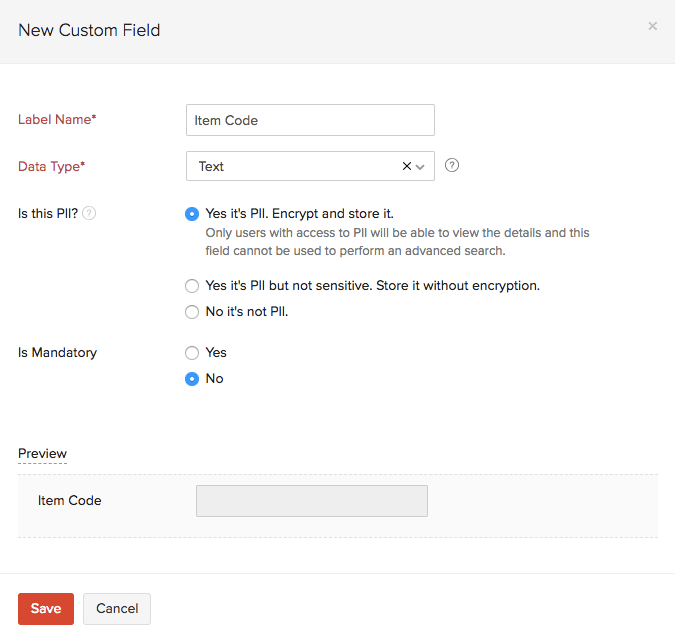
- Enter the following information and click Save.
| Fields | Description |
|---|---|
| Label Name | Enter a suitable name for your custom field. |
| Data Type | Select from a variety of data types including text, email, number, number, amount, percent, check box, auto-generate number, dropdown and attachment. |
| Is this PII? | Yes it’s PII. Encrypt and store it. - Any Personally Identifiable Information (PII) in this field is encrypted and stored. Yes it’s PII but not sensitive. Store it without encryption. - Personally Identifiable Information (PII) is stored without any encryption. No it’s not PII. - Data is stored as a regular field. |
| Is Mandatory | Choose whether or not this field is mandatory while creating an item. |
| Show when creating transactions | Choose whether or not this field should be displayed while creating transactions for items. |
| Show in transaction types | Choose whether this field is displayed for Sales or Purchase transactions or both. |
| Show in all PDF | Choose whether or not this field should be displayed in the transaction PDF. |
 Yes
No
Yes
No
 Thank you for your feedback!