- HOME
- Know Your Tech
- The top workflow integration software of 2026
The top workflow integration software of 2026
- Last Updated : January 28, 2026
- 845 Views
- 7 Min Read
Summary:
In 2026, integration platforms need to support real-time workflows, evolving processes, and built-in governance.
AI assistance and low-code capabilities are reducing the effort required to build and maintain integrations.
There is no single best platform. Each tool is built for a different level of complexity, scale, and budget.
The safest way to choose is to start with one workflow, test the fit, and expand.
Broken hand-offs and disconnected apps quietly cost teams hours every week—not because people are careless, but because systems do not talk to each other the way work actually moves. Leaders want visibility, and for that they need data to flow cleanly across teams. They also want the freedom to adapt without waiting through long IT cycles just to make a small change.
Fixing this is not only about speed; it's about reducing errors, protecting sensitive data, and scaling operations without creating new layers of confusion. Automation can help, but it depends on how well systems work together behind the scenes.
That is where integration tools come in. There is no single best option for every business. The platforms that matter in 2026 are the ones built to solve deeper workflow challenges, not just automate surface-level tasks.
The 2026 trends influencing integration software
Integration tools are evolving because work itself is changing. These trends are shaping how modern platforms are built and how teams expect them to behave.
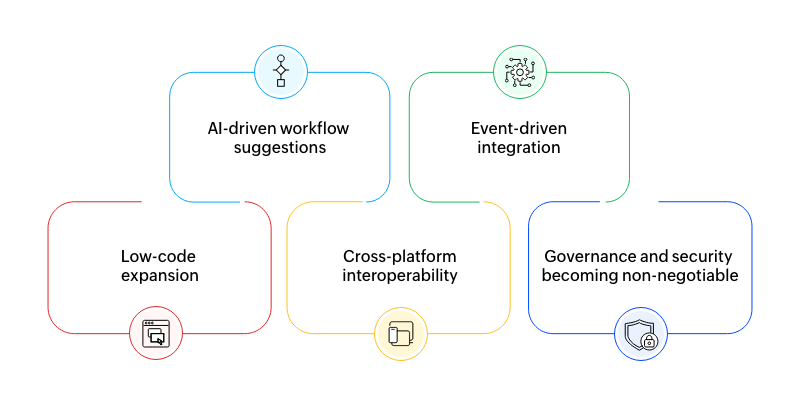
AI-driven workflow suggestions
Platforms now use AI-enabled assistance to map fields, suggest next steps, and flag broken logic before it causes problems. This lowers the effort required to build reliable workflows, especially for non-technical teams.
Event-driven integration
Instead of checking for updates every few minutes, workflows now react the moment something changes. Status updates, approvals, and data syncs happen in real time, which matters when teams depend on fast decisions.
Low-code expansion
The line between integration tools and application platforms is blurring. Teams want to design workflows, build interfaces, and manage data in one place rather than stitching together multiple tools.
Cross-platform interoperability
Modern businesses run on a mix of SaaS tools, internal systems, and custom apps. Integration platforms are expected to handle all of them without breaking under complexity.
Governance and security becoming non-negotiable
As automation spreads, so does risk. Access control, audit logs, approval layers, and compliance standards are now baseline expectations, not enterprise-only features.
The top workflow integration software of 2026
The platforms below stand out because they balance power with usability. Each one supports real-world scale and aligns with the trends shaping integration today. They're not competing for the same user but are solving different problems.
Zoho Creator
Zapier
Microsoft Power Automate
IFTTT
Workato
Creatio
Nintex
Platform | Best for | Complexity level | Pricing feel |
Zoho Creator | Custom apps and scalable workflows | Low to medium | Mid-range, value-focused |
Zapier | Fast SaaS automation | Low to medium | Grows with usage |
Power Automate | Microsoft-first environments | Medium to high | Layered licensing |
IFTTT | Simple triggers and IoT | Low | Very affordable |
Workato | Enterprise system coordination | High | Premium |
Creatio | CRM-driven processes | Medium to high | Mid to high |
Nintex | Compliance and document workflows | Medium | Mid-range |
Feature breakdown and ideal use cases
1. Zoho Creator
Strengths: Unified low-code environment, flexible workflow builder, and deep integrations
Ideal for: Teams that want custom workflows and applications without enterprise spend
Zoho Creator goes beyond basic integrations. It enables teams to design data models, define business logic, and automate workflows in a single, unified environment while also connecting seamlessly with existing tools and services through built-in integrations and APIs.
This makes it especially useful for teams dealing with evolving processes. With some up-front planning, Creator provides a strong foundation that delivers increasing value over time, giving teams flexibility and control as their needs grow.
2. Zapier
Strengths: Fast setup and wide connector ecosystem
Ideal for: Marketing, sales, and support teams that want quick wins
Zapier is often the first integration tool teams try, and for good reason. It removes friction quickly. You can connect tools, automate notifications, and eliminate manual steps in minutes.
Where Zapier struggles is depth. As workflows grow more conditional or involve multiple systems, maintenance becomes harder. It works best as a tactical solution rather than the backbone of complex business operations.
3. Microsoft Power Automate
Strengths: Enterprise-level governance, tight Microsoft tie-ins
Ideal for: Organizations already living inside Office 365, Dynamics, or Azure
Power Automate fits naturally into Microsoft-first environments. Approvals, document flows, RPA, and data movement across Microsoft tools are handled cleanly. Governance features are strong, which matters for regulated industries.
Outside the Microsoft ecosystem, however, the platform can feel heavy. Licensing models and workflow complexity require careful planning, especially as usage expands.
4. IFTTT
Strengths: Simple automation across apps and devices and easy IoT triggers
Ideal for: Lightweight workflows and smaller teams
IFTTT is designed for simplicity. It works well for basic triggers and straightforward automations, especially across consumer apps and devices.
It is not meant to handle structured business processes or complex data flows. Teams usually outgrow it once automation becomes core to operations rather than a convenience.
5. Workato
Strengths: Enterprise-grade integration and workflow coordination
Ideal for: Large companies with complex system landscapes
Workato is built for scale. It handles complex integrations, data transformations, and cross-system coordination with strong governance controls.
This power comes at a cost. It's best suited for organizations with dedicated technical teams and a clear integration strategy. For smaller teams, it can feel excessive.
6. Creatio
Strengths: Strong process automation with CRM context baked in
Ideal for: Industries with predictable, high-volume processes like sales operations or service management
Creatio works well when workflows revolve around customers, cases, or service pipelines. The platform brings structure and consistency, which is valuable in process-heavy environments.
It's less flexible for teams that need frequent, unstructured changes or lightweight automation across unrelated tools.
7. Nintex
Strengths: Document-centric automation and workflow logic
Ideal for: Operations and compliance-driven environments
Nintex is often chosen where documentation, approvals, and compliance are central. It supports structured workflows well and integrates deeply with document-driven processes.
Teams should expect some onboarding effort. The platform rewards consistency and discipline more than rapid experimentation.
Picking the right fit
Choosing an integration platform becomes easier when teams focus less on features and more on how work actually flows.
For startups
Speed matters more than perfection. Tools like Zapier or IFTTT help eliminate manual steps quickly without heavy planning. They allow teams to move fast and experiment, even if they aren't built for long-term complexity.
For growing SMBs and mid-market teams
As teams grow, ad-hoc automation starts breaking down. Platforms like Zoho Creator or Nintex offer more structure while still remaining accessible. They help teams standardize workflows without forcing enterprise-level cost or complexity.
For enterprise complexity
Large organizations with multiple systems, departments, and compliance requirements benefit from platforms like Workato. The focus here is control, reliability, and scale rather than speed of setup.
In cases where enterprise teams need custom workflows, internal applications, or department-level automation, platforms like Zoho Creator can also play a role alongside larger integration stacks.
For Microsoft-centric environments
When Microsoft tools already power daily operations, Power Automate fits naturally. It reduces friction, improves governance, and keeps workflows within a familiar ecosystem.
For process-driven departments
Operations, finance, service, and compliance teams need repeatability and clarity. Creatio and Nintex work well where approvals, documentation, and structured flows are non-negotiable.
For teams prioritizing flexibility and cost efficiency
Zoho Creator fits teams that want custom applications and deeper integration without stepping into high enterprise spend. It works best when workflows are expected to evolve over time rather than stay fixed.
Closing thoughts
Workflow integration in 2026 is less about connecting tools and more about improving how work actually moves across teams. The platforms discussed here are not competing to be the single best option. They exist because businesses face very different realities, from lightweight automation to tightly governed, system-wide coordination.
The right choice depends on where friction shows up today. Sometimes it's speed. Sometimes it's structure. Sometimes it's control, cost, or the ability to adapt without rebuilding everything from scratch. When teams start from those realities instead of feature lists, the decision becomes clearer.
The most effective integrations rarely begin with a full rollout. They start with one workflow that feels heavy, error-prone, or hard to track. Fix that first. Learn how the platform behaves in that particular environment, and then expand with intent.
When integration feels natural, work becomes easier to follow, easier to trust, and easier to change. This can be the real measure of success.
FAQs
1. What is workflow integration software?
Workflow integration software connects different systems, applications, and data sources so work can move automatically across teams. Instead of manual handoffs, workflows trigger actions, updates, and approvals across tools in a connected way.
2. How is workflow integration different from simple automation?
Automation focuses on completing individual tasks automatically. Integration focuses on how those tasks connect across systems.
3. Do small teams need integration tools?
Not always. For small teams with simple workflows, lightweight tools can be enough. But as soon as data needs to move across multiple tools or teams, integration helps reduce errors and manual work.
4. How should teams choose between low-code platforms and enterprise tools?
It depends on priorities. Enterprise tools prioritize governance and large-scale coordination. Low-code platforms prioritize flexibility and faster adaptation. Teams should choose based on workflow complexity, budget, and how often processes change.
5. Do workflow integration tools require IT support to set up and maintain?
The level of IT involvement depends on the platform and the complexity of the workflows being built. Some tools are designed so business teams can create and manage integrations on their own, while others benefit from IT support to handle security, governance, and long-term reliability. Often, teams start independently and involve IT as integrations grow in scale or importance.
 Ann Elizabeth Sam
Hey! I'm Ann, and I work as a content writer at Zoho Creator. I'm exploring the SaaS world through various forms of content creation. Outside of work, I love dancing and would give up anything to read a good murder mystery.